 First-Annual State of HR Identity Fraud Detection |
 Carla Roncato, VP of Product, HYPR
 4 Min. Read | March 23, 2026
In May of 2024, Microsoft first introduced the launch of External Authentication Methods (EAM) for Entra ID users. As a close partner, HYPR had worked closely with Microsoft on the new offering and were one of the first EAM providers for Entra ID. This past month, this feature reached general availability to all Entra ID users and is now called External Multi-Factor Authentication (External MFA).
With the recent launch of External MFA to general availability, we're breaking down the basics of External MFA and the benefits of using a passwordless, phishing-resistant MFA solution like HYPR for Entra ID.
What is Entra ID External MFA?
Entra ID's External MFA enables organizations to choose an external MFA solution to meet authentication requirements for workforce users when signing in to any Microsoft Entra ID-based applications (such as Microsoft Office 365, Teams, Sharepoint, and OneDrive). With External MFA, organizations can use their preferred authentication provider while satisfying Entra ID MFA requirements for Conditional Access Policies, Privileged Identity Management role activation, Identity Protection risk-based polices, and Microsoft Intune device registration.
Key Benefits of External MFA for Entra ID
A security or IT team may decide to use an external MFA in tandem with Entra ID for a number of reasons, including:
- More flexibility for organizations with mixed fleets between Microsoft and non-Microsoft devices or operating systems
- The use of specific authentication and identity verification methods, such as biometric scans, hardware keys, or phishing-resistant factors
- More consistent and improved user experience and sign-in process
- Compliance with Entra ID's MFA requirements for conditional access policies, privileged identity management, and identity protection sign-in risk policies
How Do You Configure an External Authentication Method?
To configure a new external MFA solution, Microsoft Entra admins need three pieces of information:
- An Application ID provides admin consent for your external authentication application
- A Client ID is an identifier from your external MFA provider (which can be the same value as the app ID)
- A Discovery URL is used as the OpenID Connect (OIDC) endpoint for the external provider
Using HYPR as a Microsoft Entra ID External MFA
HYPR's integration with Entra ID benefits both HYPR and Microsoft customers on multiple levels.
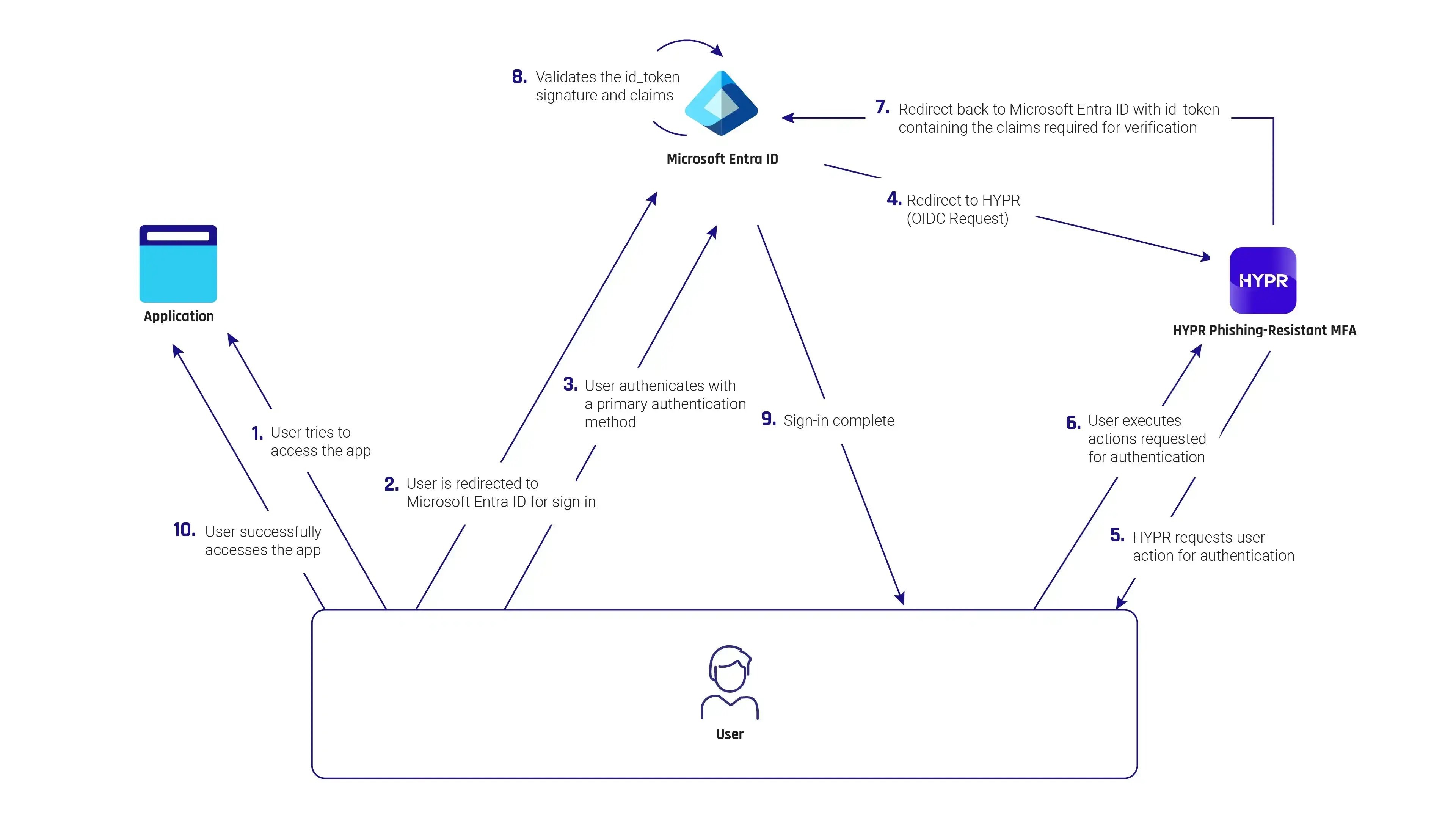 How the HYPR Entra ID external MFA integration works
Workforce and Technology Flexibility
With HYPR's External MFA integration, organizations can seamlessly use HYPR as an Entra ID authentication method to meet multi-factor authentication requirements, while maintaining flexibility with device types, operating systems, shared environments, or remote workforces. Entra ID's native authentication methods are often best for organizations operating in Windows-centric, single-device environments, but does not scale across enterprise-wide deployments. HYPR gives IT administrators the flexibility they need for modern work arrangements and workforces.
HYPR’s leading phishing-resistant MFA becomes a like-native authentication option in the Entra ID ecosystem and satisfies all MFA requirements for Conditional Access policies, Privileged Identity Management (PIM) and Identity Protection sign-in risk policies.
Enhanced Security
HYPR's passwordless authentication significantly enhances security for organizations using Entra ID. HYPR offers a true passwordless authentication experience, drastically reducing the risk of phishing attacks, credential stuffing, brute force login attempts, and other common password attacks.
Unified Authentication Processes
Many enterprises have complex IT environments with multiple identity providers and sign-in processes. These disparate systems operate in silos and can create security blind spots, inefficiencies, and inconsistent user experiences. By choosing a platform-agnostic solution like HYPR, organizations can use the same secure, phishing-resistant authentication across any IAM systems and workflows.
Improved User Experience
HYPR's passwordless MFA allows users to sign in quickly and easily without the burden of password storage or forgotten passwords. This ultimately leads to a more convenient and consistent experience for users, and less of a burden on IT teams to manage password storage, resets, or policies.
Enhanced Visibility and Control
The Microsoft external MFA integration puts some additional powerful tools into the hands of HYPR customers. Administrators and security teams can view all HYPR authentication events in the Entra ID admin center when HYPR is used as an external MFA method.
Teams also can define highly granular Conditional Access controls, based on the type of authentication factor a user applies as they authenticate with HYPR. For example, access policies can vary depending on whether someone uses a fingerprint, facial recognition or PIN, to add even stronger levels of security assurance for specific use cases or resources.
Get Started with HYPR as an Entra ID External MFA
Learn more about how large enterprises are scaling their Microsoft Identity Security strategy with here. If you are interested in using HYPR as an external MFA for Entra ID, talk to our team of experts today!
Subscribe to our updates to receive expert insights and learn how HYPR's multi-factor verification and digital identity solutions can protect your business and customers.
